

Creating Custom GPTs with ChatGPT's Built-In Tools: A Beginner's Guide


Welcome to the future of AI personalization! OpenAI's new feature within ChatGPT allows you to create custom GPT models without any coding knowledge. This blog post will guide you through using this innovative tool to tailor GPTs for your specific needs.
Step 1: Starting Your Custom GPT

Accessing the ChatGPT Interface: Begin by accessing the ChatGPT platform. This is where you'll interact with and customize your GPT model.
Initiating a Conversation: Start by engaging in a dialogue with the GPT. This initial conversation is crucial as it sets the foundation for your custom model.
Providing Clear Instructions: Clearly articulate the tasks, topics, or areas of knowledge you want your GPT to focus on. This could range from specific professional jargon to a particular style of communication.
Setting Expectations: Be specific about the type of responses you expect. For instance, if you need the GPT to provide concise answers for customer service, or detailed explanations for educational purposes, make this clear.
Iterative Process: Remember, this is an iterative process. Your first conversation is just the beginning. You'll refine and adjust your GPT's capabilities as you go along.

Step 2: Customizing Knowledge and Skills
You can supplement the GPT’s knowledge base with additional information relevant to your needs. Specify the capabilities you desire, such as web searching, image generation, or data analysis.
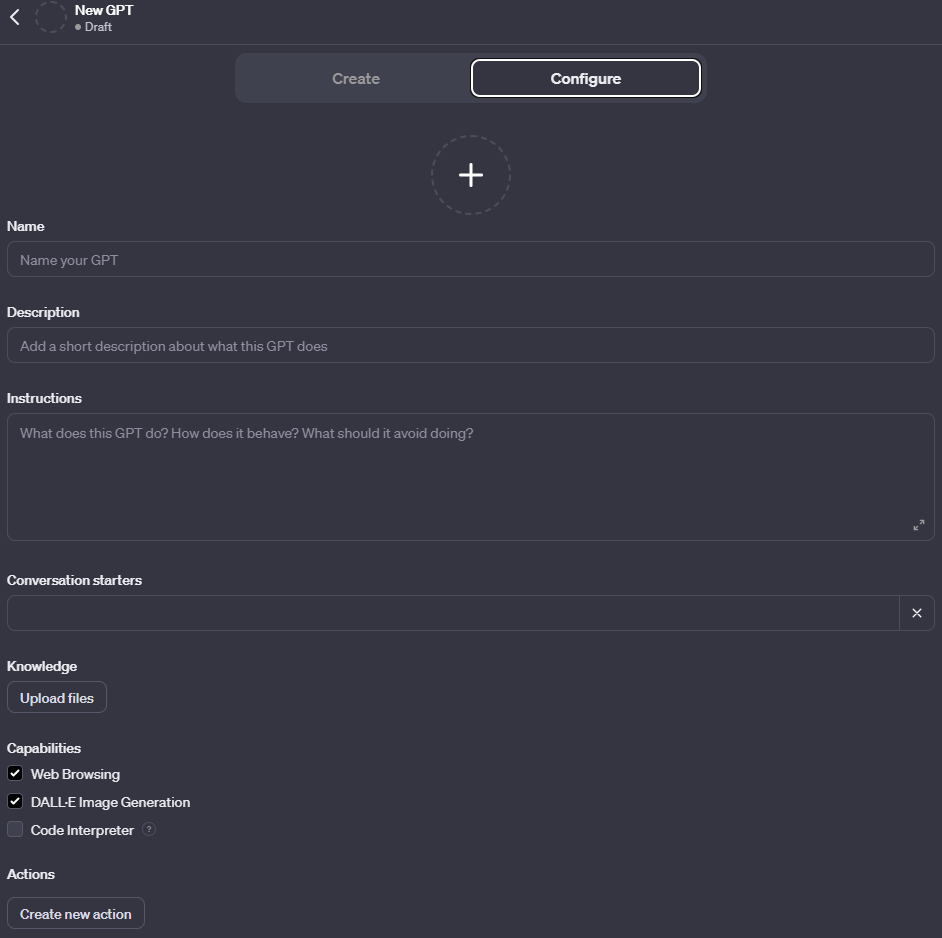
Enhancing the Knowledge Base: You have the option to augment GPT’s existing knowledge with specialized information tailored to your specific requirements. This could involve adding industry-specific terminology, frequently asked questions, or custom data relevant to your area of expertise.
Specifying Desired Capabilities: Define the specific functions you want your GPT to perform. This can range from web searching, which allows the GPT to fetch and use information from the internet, to image generation for creating visuals, or data analysis capabilities for interpreting and presenting data in meaningful ways.
Tailoring to Your Needs: The customization process is flexible, allowing you to adjust the breadth and depth of knowledge and skills of your GPT. This ensures that the GPT model aligns closely with your objectives, whether they are for business, educational, or personal use.
By enhancing and specifying the knowledge and skills of your GPT, you create a tool that is not only intelligent but also highly adapted to your unique needs.
Step 3: Fine-Tuning and Testing
Interactive Feedback Loop: Engage in an ongoing dialogue with your custom GPT. Provide specific feedback on its responses, guiding it towards the desired outcome. This iterative process allows for continuous improvement and refinement.
Testing for Alignment: Put your GPT to the test in various scenarios that mirror its intended use. This could involve simulating real-world interactions, challenging it with complex queries, or assessing its handling of unexpected inputs.
Refining Capabilities: Based on these tests, further fine-tune your GPT's capabilities. This might involve adjusting its knowledge base, refining its response style, or enhancing specific functionalities like data analysis precision or creative output in image generation.
This stage is crucial in ensuring that your GPT not only functions correctly but also aligns perfectly with your intended applications, providing a reliable and efficient AI assistant tailored to your needs.
Step 4: Sharing and Privacy
Sharing Your Custom GPT: Once you are satisfied with your GPT's performance, you have the option to share it publicly through the upcoming GPT Store. This platform allows users to showcase their custom models, making them accessible to a broader audience.
Managing Privacy Settings: It's crucial to adjust the privacy settings of your GPT. This includes controlling how your data is shared and ensuring that your GPT adheres to content guidelines. Privacy settings help maintain the security and integrity of the information processed by your GPT.
This step is about balancing accessibility and privacy, ensuring your GPT can be a valuable resource to others while safeguarding sensitive data and ethical standards.
Creating your own GPT model is now more accessible than ever. This tool opens up endless possibilities for personalized AI applications in various fields. Whether for business, education, or entertainment, the power to customize AI to your specific needs is at your fingertips.
For more detailed information and guidance, refer to the OpenAI blog post on GPTs.


Comments